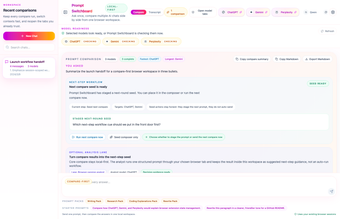
Side-panel hub for comparing multiple LLMs and agent control
multi-ai-sidepanel, developed by Xiaojiou176 Open, is a Chrome side panel and MCP server that centralizes multiple large language models into a single workspace to reduce tab switching and support model comparison. The tool sends one prompt to ChatGPT, Claude, Gemini, Grok, and DeepSeek and displays parallel responses for direct inspection. It also exposes workflows as callable tools and keeps data local. Target users are developers, researchers, and AI power users needing programmatic multi-model verification.
Run a single prompt across multiple providers and inspect differences
The tool implements a Compare Mode that forwards one input to several providers and shows their outputs in parallel, so users can detect divergence and consensus without juggling tabs. Supported providers include:
- ChatGPT
- Claude
- Gemini
- Grok
- DeepSeek
Verification depends on the underlying models, not the app
The side panel aggregates raw responses from each model, it does not alter model outputs; this means reliability is tied to each provider's accuracy. The tool is positioned for multi-model verification and agentic workflows, and it includes coding-agent integrations optimized for developer workflows, for example with Codex-style agents and Claude Code examples.
Installation and integrations assume technical familiarity
Installing typically requires cloning the repository and following the quickstart commands to bootstrap both the Chrome extension and the MCP server; this targets technical users. The MCP server exposes the side-panel workflow to clients such as Claude Desktop, VS Code, and Claude Code CLI, so integration favors existing developer toolchains rather than a consumer-grade one-click setup.
Local-first design keeps inputs on the host machine during sessions
The application uses a local-first architecture and states there is no silent telemetry, which keeps conversation data on the user's machine unless explicitly exported. The MCP bridge runs locally, so programmatic callers interact with the local server rather than relying on external round-trips for side-panel control.
A practical command hub for technically proficient teams
This tool suits teams and researchers who need an inspectable, programmatic way to compare model outputs and coordinate agent-driven workflows. Expect a developer-oriented setup and a need to fact-check model claims independently. Use it as part of a review pipeline for reproducible comparison, rather than as a consumer chat replacement or a sole source of truth for high-stakes decisions.